
Anúncios
In today’s digital age, measuring distances has never been easier thanks to innovative smartphone applications that transform your device into a powerful measurement tool.

Gone are the days when you needed bulky tape measures, laser devices, or complex surveying equipment to determine distances. Modern smartphones come equipped with advanced sensors and cameras that, combined with sophisticated algorithms, can accurately measure distances in real-time. Whether you’re a professional contractor, an interior designer, a real estate agent, or simply someone who needs to measure furniture before buying, distance measuring apps have become indispensable tools in our daily lives.
Anúncios
These applications leverage technologies like augmented reality (AR), GPS, camera sensors, and accelerometers to provide remarkably precise measurements. From measuring the height of a building to calculating the area of a room, these versatile tools offer functionalities that were once limited to specialized equipment. Let’s explore how these apps work and why they’ve become essential for millions of users worldwide. 📱
How Distance Measuring Apps Actually Work 🔍
Understanding the technology behind distance measuring applications helps appreciate their capabilities and limitations. These apps primarily use three different methods to calculate distances accurately.
Anúncios
The first method involves augmented reality combined with device sensors. When you point your phone’s camera at an object, the app uses AR technology to detect surfaces and planes in real-time. By analyzing the camera feed and combining it with data from the gyroscope and accelerometer, the app can calculate the distance between your device and the target object. This method works exceptionally well for measuring objects and spaces within a room.
The second approach utilizes GPS coordinates, particularly useful for outdoor measurements. These apps calculate the distance between two geographical points using latitude and longitude data. This method is perfect for measuring walking or running routes, property boundaries, or distances between landmarks. While GPS-based measurements may have a margin of error of a few meters, they’re incredibly useful for larger-scale distance calculations.
The third technology involves using the device’s camera height and angle calculations. By knowing the height at which you’re holding your phone and the angle at which you’re pointing the camera, the app can use trigonometry to calculate distances. This method requires you to input your device’s height from the ground, making it slightly less convenient but still remarkably accurate.


Top Features to Look for in Distance Measurement Apps ✨
Not all distance measuring apps are created equal. When choosing the right application for your needs, consider these essential features that separate excellent apps from mediocre ones.
Accuracy stands as the most critical factor. The best apps can measure distances with precision down to a few millimeters for close-range measurements and within acceptable margins for longer distances. Look for apps that clearly state their accuracy specifications and have been validated through user reviews.
Multiple measurement units provide flexibility for different scenarios. Quality apps offer conversions between metric and imperial systems, allowing you to switch between meters, feet, inches, centimeters, and yards effortlessly. This feature proves invaluable when working with international specifications or sharing measurements with others who use different measurement systems.
The ability to save and export measurements distinguishes professional-grade apps from basic ones. Look for applications that allow you to store measurement histories, create projects with multiple measurements, and export data in various formats like PDF, CSV, or image files with annotations.
User interface simplicity cannot be overstated. The best apps feature intuitive designs that don’t require extensive tutorials. Clear visual indicators, straightforward controls, and real-time feedback make the measurement process smooth and efficient, even for first-time users.
Practical Applications for Everyday Users 🏠
Distance measuring apps have found their way into countless everyday scenarios, making previously challenging tasks surprisingly simple.
Home improvement projects benefit tremendously from these applications. Before purchasing furniture, you can measure available space to ensure a perfect fit. Planning to hang artwork? Measure the wall space and visualize placement without making unnecessary holes. Need to buy curtains or blinds? Get accurate window measurements instantly.
Real estate professionals have embraced these tools enthusiastically. Property agents can quickly measure room dimensions during viewings, providing potential buyers with accurate floor plans and area calculations on the spot. This immediate information helps clients make faster, more informed decisions.
Travel enthusiasts find creative uses for distance apps. Estimate the height of monuments, measure the distance to landmarks, or calculate hiking trail lengths. These measurements add an interesting dimension to travel experiences and help with planning activities.
DIY enthusiasts and crafters use these apps for project planning. Whether you’re building custom shelves, designing a garden layout, or creating art installations, accurate measurements are just a tap away. The ability to quickly verify dimensions saves time and reduces material waste.
Professional Uses That Transform Workflows 💼
Beyond casual use, distance measuring apps have revolutionized several professional industries by streamlining workflows and improving efficiency.
Construction professionals increasingly rely on these applications for preliminary measurements and quick verifications. While traditional measuring tools remain essential for final specifications, apps provide convenient solutions for initial assessments, progress documentation, and client presentations. The ability to capture measurements with photos proves particularly valuable for project documentation.
Interior designers and architects use these apps during site visits to gather spatial data quickly. Instead of spending extensive time with measuring tapes, they can capture room dimensions, ceiling heights, and architectural features in minutes. This efficiency allows more time for creative work and client consultation.
Delivery and logistics professionals benefit from apps that calculate distances between locations. Route optimization becomes simpler when you can quickly determine the most efficient path between multiple stops. This capability saves fuel costs and improves delivery timeframes.
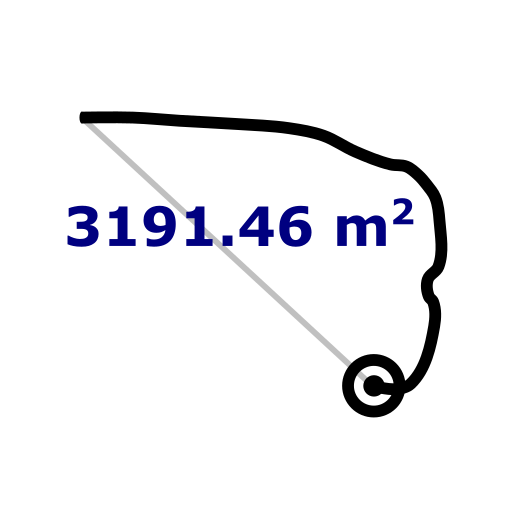
Landscaping professionals utilize distance apps to measure property areas, plan garden layouts, and estimate material requirements. The ability to measure irregular shapes and calculate areas directly on-site streamlines the quotation process and improves accuracy in project proposals.
Tips for Achieving Maximum Accuracy 🎯
While distance measuring apps are remarkably accurate, following best practices ensures you get the most reliable results possible.
Calibration matters significantly. Many apps include calibration features that adjust measurements based on your specific device. Take time to calibrate your app properly, following the provided instructions carefully. This one-time setup dramatically improves measurement accuracy.
Lighting conditions affect performance considerably. AR-based measurement apps work best in well-lit environments where surfaces and edges are clearly visible. Avoid measuring in dim lighting or overly bright conditions that create harsh shadows, as these can confuse the app’s detection algorithms.
Steady hands produce better results. When taking measurements, hold your device as steadily as possible. Some apps include stabilization features, but physical stability always improves accuracy. Consider using a tripod adapter for your phone when extremely precise measurements are required.
Clear surfaces yield clearer measurements. Remove obstacles and ensure the area you’re measuring is free from clutter. AR technology works by detecting planes and surfaces, so clean, unobstructed views produce the most accurate results.
Verify important measurements using multiple methods. For critical projects, take measurements several times or use different apps to cross-reference results. When extreme precision is required, complement app measurements with traditional tools for verification.
Understanding Limitations and When to Use Traditional Tools ⚖️
Despite their impressive capabilities, distance measuring apps have limitations that users should understand to make informed decisions about when to use them.
Precision requirements dictate tool selection. While apps excel at providing quick, reasonably accurate measurements for most purposes, they may not achieve the precision required for some professional applications. Construction projects requiring millimeter-perfect accuracy still benefit from laser measuring devices or surveying equipment.
Environmental factors impact performance significantly. GPS-based distance apps struggle with accuracy in areas with poor satellite visibility, such as dense urban environments or indoors. AR-based apps face challenges with reflective surfaces, transparent materials, or environments lacking distinct visual features.
Device capabilities create variation in performance. Older smartphones with less sophisticated sensors produce less accurate measurements than newer models with advanced camera systems and improved processors. Understanding your device’s capabilities helps set realistic expectations.
Legal and professional standards sometimes require certified measuring tools. Official property surveys, regulatory compliance measurements, and legal documentation often mandate the use of certified equipment. While apps provide excellent preliminary data, verify whether your specific situation requires formally certified measurements.
Privacy and Data Security Considerations 🔒
As with any smartphone application, understanding privacy implications helps you make informed decisions about which apps to trust with your data.
Camera and location permissions are fundamental requirements for distance measuring apps. Before granting these permissions, review the app’s privacy policy to understand how your data is collected, stored, and used. Reputable apps clearly explain their data practices and limit data collection to what’s necessary for functionality.
Photo storage raises important considerations. Some apps save photos taken during measurements for reference purposes. Understand where these photos are stored—locally on your device or uploaded to cloud servers—and whether they’re encrypted. Control over photo deletion is equally important.
Location data handling varies significantly between apps. GPS-based measurement apps require access to your location, but how they use this information differs. Some apps anonymize and aggregate location data, while others may share identifiable information with third parties for advertising purposes.
Offline functionality provides both convenience and privacy benefits. Apps that work entirely offline without requiring internet connectivity typically offer better privacy protection, as your measurements and photos never leave your device unless you explicitly choose to share them.
The Future of Distance Measurement Technology 🚀
Innovation in smartphone technology continues to enhance distance measuring capabilities, promising even more impressive features in the near future.
LiDAR integration represents a significant advancement. Recent flagship smartphones include LiDAR sensors that emit laser pulses to measure distances with exceptional accuracy. Apps leveraging LiDAR technology achieve professional-grade precision, making smartphone measurements viable for increasingly demanding applications.
Artificial intelligence improvements enhance measurement accuracy and functionality. Machine learning algorithms better recognize objects, surfaces, and spatial relationships, reducing errors and enabling new features like automatic dimension detection and intelligent measurement suggestions.
Augmented reality advancements promise more immersive measurement experiences. Future apps may overlay precise measurements directly onto your view of the real world, display 3D models of measured spaces, or provide interactive guidance during complex measurement tasks.
Integration with other technologies expands possibilities. Imagine measuring apps that automatically sync with CAD software, generate shopping lists based on measured spaces, or connect with smart home systems to suggest optimal furniture arrangements based on room dimensions.
Maximizing Value from Your Distance Measuring App 💡
Getting the most from these powerful tools involves understanding advanced features and creative applications beyond basic distance measurement.
Area and volume calculations extend functionality significantly. Rather than measuring length and width separately and calculating area manually, many apps automatically compute areas for rectangular spaces or even irregular shapes. Volume calculations prove invaluable for estimating paint quantities, concrete requirements, or storage capacity.
Photo annotation features transform measurements into comprehensive documentation. Apps that allow you to add measurements directly onto photos create professional-looking records perfect for sharing with clients, contractors, or simply keeping for personal reference.
Project organization capabilities help manage multiple measurement tasks. Create separate projects for different rooms, properties, or clients, keeping all related measurements organized and easily accessible. This organization proves particularly valuable for professionals managing multiple simultaneous projects.
Sharing and collaboration features facilitate teamwork. Export measurements in various formats compatible with other software, or share directly with colleagues and clients through email or messaging apps. This seamless data transfer eliminates transcription errors and speeds up project workflows.
Choosing the Right App for Your Specific Needs 📲
With countless distance measuring apps available, selecting the ideal one requires evaluating your specific requirements and usage patterns.
Identify your primary use case first. Are you measuring room dimensions for furniture shopping? Calculating outdoor distances for running routes? Documenting construction progress? Different apps excel at different tasks, so understanding your main needs guides your selection process.
Evaluate the interface and ease of use. Download several highly-rated apps and test them in real-world scenarios. The best technical features mean nothing if the app frustrates you with a confusing interface or cumbersome workflow. Choose an app that feels intuitive and matches your technical comfort level.
Consider your budget carefully. While many excellent free apps exist, premium versions often provide advanced features, remove advertisements, and offer better customer support. Evaluate whether professional features justify the cost based on how frequently you’ll use the app and the value it provides.
Read recent user reviews thoroughly. Focus on reviews from users with similar needs and device models. Pay attention to comments about accuracy, reliability, and how well the developer responds to issues and feature requests. An actively maintained app with responsive developers typically represents a better long-term investment.
Complementing Apps with Traditional Measuring Techniques 📐
The smartest approach combines digital innovation with time-tested traditional methods, leveraging the strengths of both approaches.
Use apps for quick preliminary measurements and estimations. When you’re shopping for furniture, planning a project, or need approximate dimensions, apps provide fast, convenient answers without carrying additional tools. This preliminary data helps you make informed initial decisions.
Verify critical measurements with traditional tools. For final cuts, expensive purchases, or professional installations, confirm app measurements using tape measures, laser distance meters, or other traditional instruments. This verification step prevents costly mistakes while still benefiting from the convenience of app-based measurements.
Combine methods for comprehensive documentation. Take measurements with traditional tools while simultaneously documenting them using app photo annotation features. This hybrid approach creates thorough records that combine accuracy with visual context, making future reference simple and clear.
Learn from both technologies. Understanding traditional measuring principles makes you better at using apps effectively. Conversely, using apps develops your spatial awareness and estimation skills, making you more efficient even when using conventional measuring tools.
Transforming How We Interact with Physical Spaces 🌟
Distance measuring apps represent more than simple digital replacements for tape measures—they fundamentally change how we perceive and interact with the physical world around us.
Empowerment through accessibility stands as the most significant impact. Professional-quality measuring capabilities that once required expensive equipment or specialized training now fit in everyone’s pocket. This democratization enables people to tackle projects, make decisions, and solve problems they might have previously avoided due to measurement challenges.
Speed and efficiency transform workflows across countless scenarios. What previously required scheduling time for measuring, recording data, and possibly revisiting spaces for forgotten dimensions now happens in moments. This efficiency cascades into faster decision-making, reduced project timelines, and decreased frustration.
Enhanced confidence in decision-making emerges from having instant access to accurate information. Whether you’re buying furniture online, planning a renovation, or evaluating a potential apartment rental, immediate measurement capabilities reduce uncertainty and support better choices.
Creative problem-solving flourishes when measurement becomes effortless. With barriers to gathering spatial information removed, people find innovative solutions to challenges, experiment with new ideas, and confidently tackle projects that previously seemed too complex or risky.
As technology continues evolving, distance measuring apps will become even more sophisticated, accurate, and integrated into our daily lives. They exemplify how smartphones transform into versatile tools that extend our capabilities and simplify previously complex tasks. Whether you’re a professional who needs reliable measurements regularly or someone who occasionally needs to measure something, these apps deliver remarkable value that fits literally in your pocket. Embrace this technology, explore its capabilities, and discover how it can make your life more convenient, productive, and empowered. 🎉