
Anúncios
Remote control apps have revolutionized how we interact with our devices, bringing convenience and innovation to our daily lives like never before.

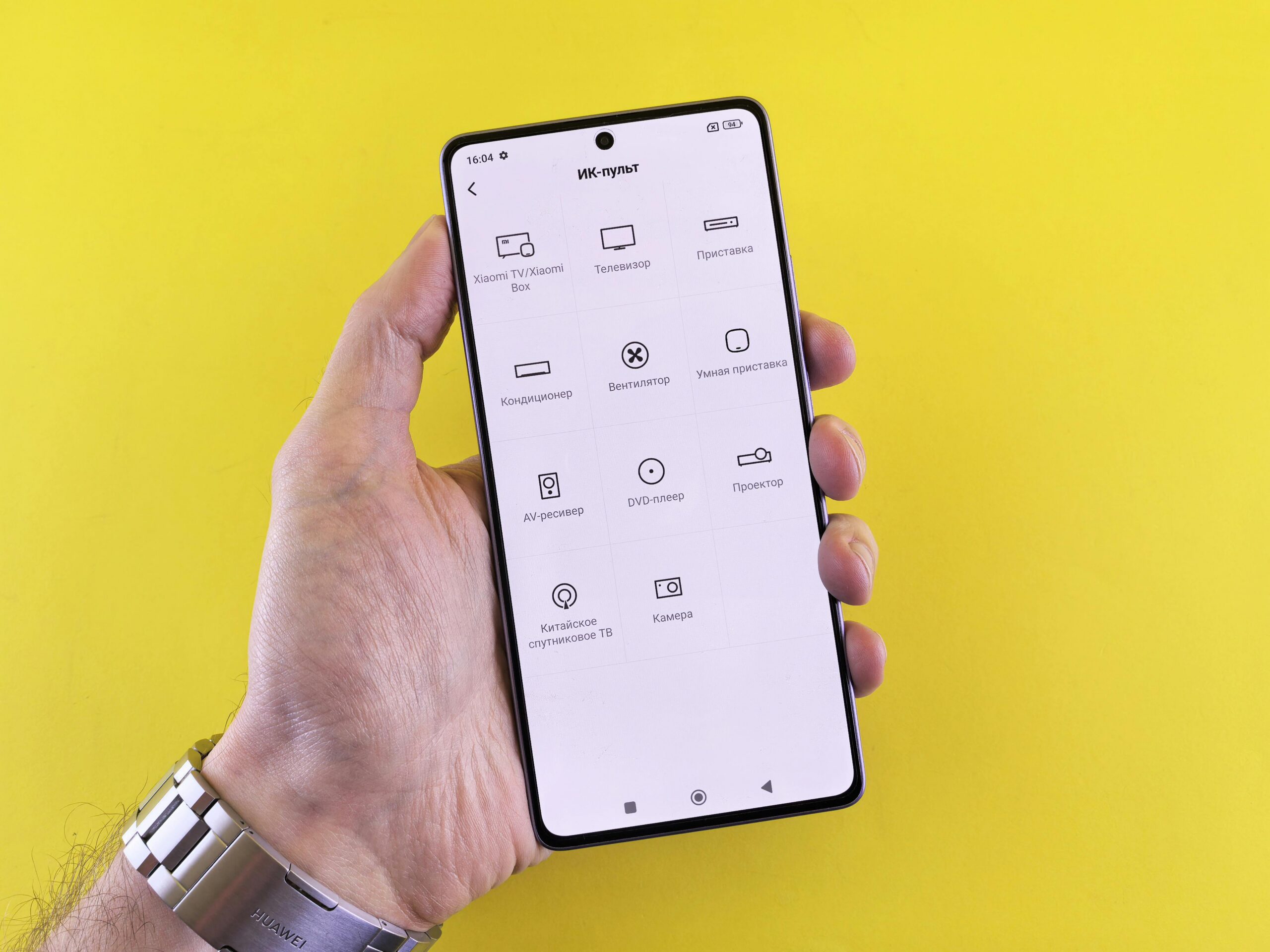
Gone are the days when losing your TV remote meant frantically searching under couch cushions or between furniture. Today’s smartphones have become powerful universal controllers capable of managing everything from televisions and air conditioners to smart home devices and streaming platforms.
Anúncios
The emergence of remote control applications represents a significant shift in how we manage our entertainment systems and household electronics. These apps transform your mobile device into a versatile control hub, eliminating the need for multiple physical remotes cluttering your coffee table. 📱
Why Remote Control Apps Are Changing the Game
The modern household contains an average of four remote controls, each dedicated to a specific device. This proliferation creates confusion, frustration, and unnecessary complexity. Remote control apps solve this problem elegantly by consolidating all your controls into one intuitive interface.
Anúncios
Smartphone-based remote controls offer several distinct advantages over their traditional counterparts. They’re always within reach since most people keep their phones nearby constantly. The touchscreen interface allows for more sophisticated controls and customization options that physical buttons simply can’t match.
Additionally, these apps frequently receive updates that expand compatibility and add new features, something impossible with traditional infrared remotes. This means your control capabilities actually improve over time rather than becoming obsolete.


Understanding How Remote Control Apps Actually Work
Most remote control applications utilize either infrared (IR) technology or Wi-Fi connectivity to communicate with your devices. IR-based apps require your smartphone to have an infrared blaster, a small component that emits infrared signals just like traditional remotes.
Wi-Fi-based remote apps connect to smart devices through your home network, offering greater range and more advanced functionality. These apps can control devices from anywhere in your home, or even remotely when you’re away, depending on the device and app capabilities.
Some sophisticated apps employ both technologies, automatically selecting the best connection method based on the device you’re controlling. This hybrid approach maximizes compatibility while ensuring optimal performance across different scenarios.
Setting Up Your Remote Control App 🔧
Getting started with a remote control app is remarkably straightforward. After downloading and installing the application, you’ll typically go through a simple setup process that identifies your devices and configures the appropriate controls.
The app will scan for available devices on your network or prompt you to manually select your device brand and model. Most quality apps maintain extensive databases containing control codes for thousands of device models from hundreds of manufacturers.
Once configured, you can customize button layouts, create macros for multiple actions, and organize your controls in ways that make sense for your specific setup. This personalization transforms the app from a simple replacement into an enhanced control experience.

Key Features That Make These Apps Indispensable
Modern remote control apps pack impressive functionality that extends far beyond basic channel changing and volume adjustment. Voice control integration allows you to operate devices using natural language commands, adding another layer of convenience to your smart home ecosystem.
Gesture controls enable you to navigate menus and content with intuitive swipes and taps, often proving faster and more precise than traditional button presses. This touch-based interaction feels natural on smartphones and tablets, leveraging the devices’ native capabilities.
Keyboard functionality transforms your phone into a full QWERTY input device, making text entry on smart TVs infinitely easier than hunting and pecking with directional buttons. This feature alone saves countless minutes when searching for content or logging into streaming services.
Smart Home Integration Capabilities
The true power of remote control apps emerges when they integrate with broader smart home systems. Many apps connect seamlessly with platforms like Google Home, Amazon Alexa, and Apple HomeKit, becoming part of a coordinated automation ecosystem.
This integration enables sophisticated scenarios like automatically dimming lights, closing blinds, and powering on your TV when you select “movie mode” in your smart home app. The remote control app acts as a crucial component in these multi-device automations.
Cross-platform compatibility ensures that regardless of which smart home ecosystem you’ve invested in, your remote control app can participate and enhance the overall experience. This interoperability represents the future of connected home technology.
Choosing the Right Remote Control App for Your Needs
Not all remote control apps are created equal, and selecting the right one depends on your specific devices and usage patterns. Consider which devices you need to control most frequently and ensure the app supports those particular brands and models.
User interface design significantly impacts daily usability. Look for apps with clean, intuitive layouts that don’t require consulting a manual to understand. The best apps feel immediately familiar while offering depth for users who want advanced customization.
Reading user reviews provides valuable insights into real-world performance and reliability. Pay particular attention to reviews from users with similar devices to yours, as compatibility and functionality can vary significantly across different hardware configurations.
Compatibility Considerations 📺
Before committing to a remote control app, verify that it supports your specific device models. While popular brands typically enjoy broad support, less common or older devices might have limited compatibility with certain apps.
Check whether the app requires infrared capability or works exclusively through Wi-Fi. This distinction is crucial because not all smartphones include IR blasters, particularly newer flagship models that have phased out this component in favor of sleeker designs.
Operating system requirements matter too, especially if you plan to use the app on multiple devices or might upgrade your phone in the future. Ensure the app receives regular updates and supports current OS versions to avoid compatibility issues down the road.
Maximizing Your Remote Control App Experience
Once you’ve installed and configured your remote control app, take time to explore its advanced features and customization options. Creating personalized control screens for different activities enhances efficiency and makes the app more enjoyable to use.
Experiment with macro commands that execute multiple actions with a single tap. For example, a “bedtime” macro might turn off the TV, switch off connected lamps, and activate your security system simultaneously, streamlining your nightly routine.
Many apps offer widget support, placing your most-used controls directly on your phone’s home screen. This eliminates the need to open the app for quick actions like volume adjustment or power control, saving precious seconds throughout the day.
Troubleshooting Common Issues 🔍
Connection problems represent the most frequent challenge with remote control apps. If your app isn’t detecting devices, verify that both your phone and the target device are connected to the same Wi-Fi network and that no firewall settings are blocking communication.
For infrared-based controls, ensure nothing obstructs the line of sight between your phone and the device. IR signals require direct visibility similar to traditional remotes, though some phones have stronger emitters that can bounce signals off walls effectively.
Battery drain can become noticeable if the app constantly scans for devices or maintains active connections. Adjust settings to reduce background activity, or manually disconnect when not actively using the remote functions to preserve battery life.
Security and Privacy Considerations
When granting an app control over your home devices, understanding privacy implications is essential. Reputable remote control apps employ encryption to protect communication between your phone and controlled devices, preventing unauthorized access or interception.
Review the app’s permission requests carefully before installation. A legitimate remote control app needs network access and possibly infrared permissions, but shouldn’t require access to unrelated functions like your contacts, messages, or location unless clearly justified.
Regular updates from the app developer indicate ongoing security maintenance and bug fixes. Apps that haven’t been updated in over a year may contain unpatched vulnerabilities or lack compatibility with newer security protocols implemented by device manufacturers.
The Future of Remote Control Technology
Artificial intelligence integration promises to make remote control apps even more intuitive and helpful. Future versions might learn your viewing habits and proactively suggest content, automatically adjust settings based on time of day, or anticipate your needs before you explicitly state them.
Augmented reality features could revolutionize device setup and control by overlaying digital information onto your physical environment through your phone’s camera. Imagine pointing your phone at a device and seeing floating controls appear exactly where you need them.
Improved interoperability standards will likely emerge, enabling seamless control across brands and ecosystems that currently remain siloed. This consolidation will finally deliver on the promise of truly universal remote control from any device to any other device.
Sustainability Benefits of Going Digital ♻️
Consolidating multiple physical remotes into a single app reduces electronic waste and the environmental impact of manufacturing, packaging, and shipping dedicated control devices. This shift aligns with broader sustainability goals while delivering practical benefits to users.
Battery waste decreases significantly when you eliminate the need for constant AA and AAA battery replacements across multiple remotes. Your smartphone’s rechargeable battery serves all your control needs without generating the hazardous waste associated with disposable batteries.
The longevity of app-based controls surpasses physical remotes, which wear out, break, or become lost. Software updates extend functionality indefinitely, while physical remotes become obsolete when buttons fail or devices no longer respond to outdated infrared codes.
Making the Switch: Practical Tips for Success
Transitioning from traditional remotes to app-based control works best when approached gradually. Start by using the app for your most-frequently-controlled device, typically your television or streaming box, before expanding to other electronics.
Keep your physical remotes accessible during the initial adjustment period. This safety net reduces frustration if you encounter technical difficulties or need to control a function that hasn’t been properly configured in the app yet.
Involve family members or roommates in the transition, ensuring everyone understands how to use the app for basic functions. Creating a shared understanding prevents confusion and ensures that household entertainment remains accessible to everyone regardless of their technical comfort level.
Enhancing Entertainment with Advanced Controls
Remote control apps unlock content discovery features that traditional remotes can’t match. Built-in search functions let you find movies, shows, or music across multiple streaming platforms simultaneously, eliminating the tedious process of checking each service individually.
Program guides and schedule integration help you discover what’s playing now or upcoming on various channels and services. This consolidated view transforms content selection from a chore into an enjoyable browsing experience that might introduce you to new favorites.
Casting capabilities enable you to send content from your phone to your TV with a simple tap, bridging the gap between mobile and big-screen viewing. This functionality has become indispensable for sharing photos, videos, and web content with groups.
Professional and Commercial Applications
Remote control apps aren’t limited to residential use; businesses increasingly deploy them for conference room management, digital signage control, and customer-facing displays. The centralized control and logging capabilities provide advantages that physical remotes simply cannot deliver.
Hotels and hospitality venues use remote control apps to simplify guest experiences while reducing the cost and hassle of replacing lost or damaged room remotes. Some properties provide tablet-based controls that also serve as concierge information systems and service request platforms.
Educational institutions benefit from simplified classroom technology management, allowing teachers to control presentation equipment, lighting, and audio systems from a single interface without juggling multiple remotes or wall-mounted control panels.
Your Entertainment, Perfectly Controlled ✨
Embracing remote control apps represents more than just replacing a physical device with digital convenience. It’s about reclaiming simplicity in an increasingly complex technological landscape, putting sophisticated control at your fingertips without overwhelming complexity.
The transformation from traditional remotes to smart app-based control reflects broader technological evolution toward integration, personalization, and intelligence. These apps exemplify how thoughtful software design can enhance everyday experiences in meaningful, tangible ways.
Whether you’re frustrated with lost remotes, seeking to streamline your smart home, or simply curious about modern control options, remote control apps offer an accessible entry point into enhanced device management. The technology has matured to the point where it genuinely improves upon what came before, rather than simply offering a different approach.
Download a remote control app today and discover how much easier managing your entertainment and smart devices can be. Your coffee table will thank you for the decluttering, and you’ll wonder how you ever managed with a drawer full of confusing, battery-hungry remotes.